
We offer a 5K Email Blast to Any Demographic! Get it here.     -     Let's blog for you $45/blog

How to Repair a Database via phpMyAdmin in cPanel Print

  • Database
  • 0

1. Log in to your cPanel account.

2. In the Databases section, click on phpMyAdmin.

A great  example: cPanel image from our Omaha web design and SEO company

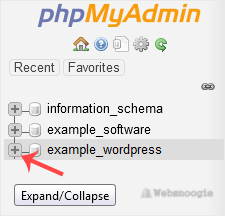
3. Click the Expand icon from the navigation tree in the left sidebar.
A great  example: cPanel image from our Omaha web design and SEO company


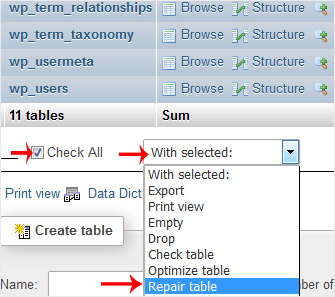
4. Scroll down and mark Check All. Then click on the drop-down arrow and select Repair table.
A great  example: cPanel image from our Omaha web design and SEO company

If the table has been repaired successfully, it will show an OK message. Otherwise, it will display an error on some tables.


Was this answer helpful?

« Back