
We offer a 5K Email Blast to Any Demographic! Get it here.     -     Let's blog for you $45/blog

How to Remove a Domain in Plesk Print

  • 0

You can remove a domain in Plesk by following this tutorial.

1. Log in to your Plesk account.

2. Click on Websites & Domains from the Sidebar Menu.

An example image of domain management from our Omaha web design and hosting company

3. Under the list of domains, click on the More icon An example image of domain management from our Omaha web design and hosting company in front of the domain and select Remove website.
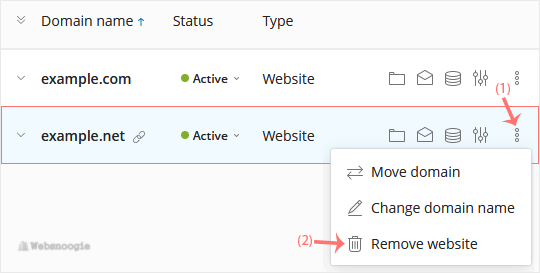
An example image of domain management from our Omaha web design and hosting company

4. Confirm with Yes to remove the domain.


Was this answer helpful?

« Back