
1. Log in to your cPanel account.
2. In the Databases section, click on MySQL Databases.

![]()
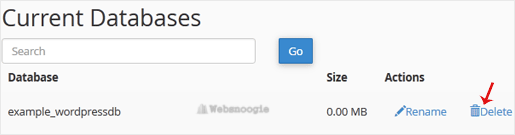
3. Under Current Databases, you can see a list of all your databases. Locate the database you want to remove and click on Delete.
4. Click on Delete Database.

We offer a 5K Email Blast to Any Demographic! Get it here. - Let's blog for you $45/blog
1. Log in to your cPanel account.
2. In the Databases section, click on MySQL Databases.
![]()
3. Under Current Databases, you can see a list of all your databases. Locate the database you want to remove and click on Delete.
4. Click on Delete Database.